 Rough
Rough
Search every transcript
Type a phrase and jump straight to the moment it was said, across every transcribed clip in your Final Cut Pro libraries.
Mac · Final Cut Pro companion
RoughCut helps you search transcripts across your Final Cut Pro libraries, find interview moments, and assemble selects into an editable Final Cut Pro project.
Story first. Timeline next.
Free forever to search and build. One-time in-app purchase. No subscription.
Requires macOS 15.6 or later. Final Cut Pro required for project creation and the Workflow Extension.
Type a phrase and jump straight to the moment it was said, across every transcribed clip in your Final Cut Pro libraries.
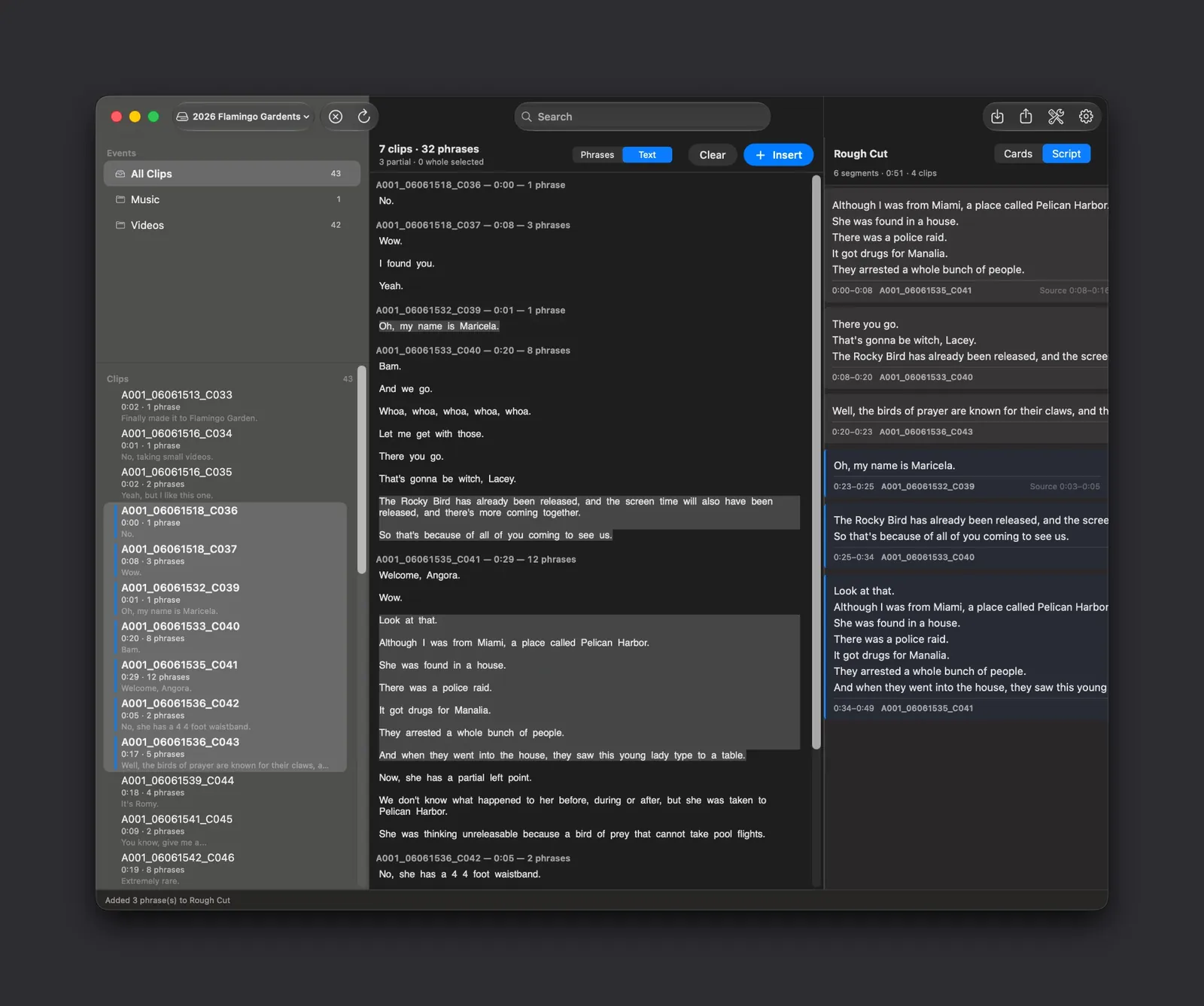
Collect the lines that matter into one ordered assembly. Reorder beats, trim in and out points, and save it as a .roughcut document.
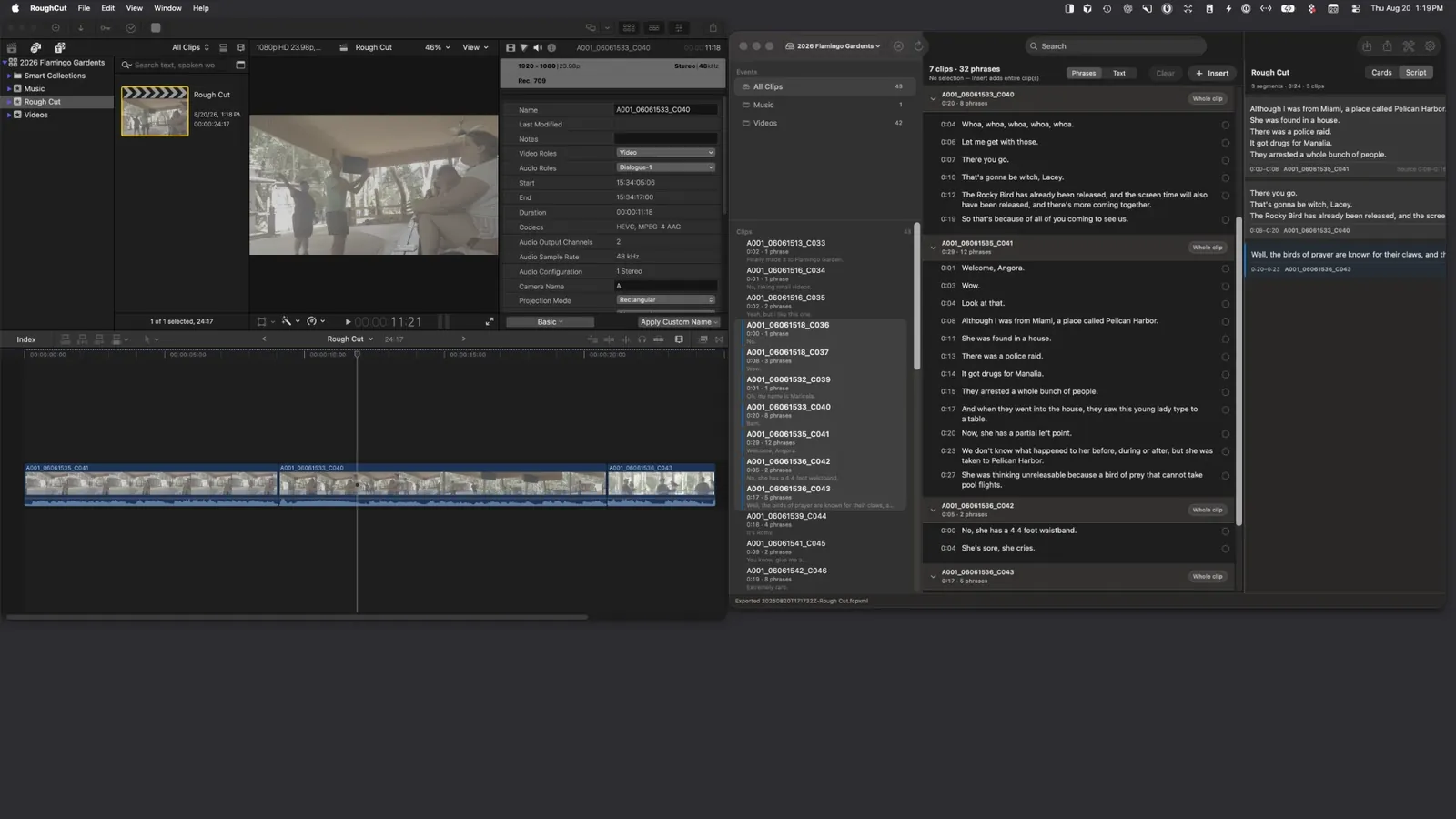
Turn the assembly into an editable Final Cut Pro project — your clips, your order, real in and out points on a real timeline.
The part markers can't do
An editable Final Cut Pro project with your clips already assembled in story order — real in and out points, ready to trim and grade. Your original media is never touched.
New to working from transcripts? Read the guide to text-based video editing for Final Cut Pro interviews.
Read the edit as story beats or as continuous script text, whichever way you think about structure.
Part of the paid project unlock: import and export FCPXML when the assembly has to move to another system or editor.
Copy a clean, structured transcript block to paste into the assistant of your choice. Nothing leaves your Mac unless you paste it.
One-time in-app purchase. No subscription.
Create Final Cut Projects unlocks project creation. A 7-day trial starts the first time you successfully create a Final Cut Pro project. The current price in your local currency is shown in the app and on the Mac App Store listing before you buy. Introductory pricing may apply at launch.
Pricing detailsIt's an approach to editing that starts with the words in a transcript rather than the timeline. You search and select dialogue, build the story in text form, and then generate a real video project — in RoughCut's case, an editable Final Cut Pro project.
No. Libraries are read and processed locally on your Mac. Diagnostics are never transmitted automatically — you can optionally export a report and send it to support yourself.
No. RoughCut reads your libraries and their existing transcriptions. Rough Cuts live in their own .roughcut documents, and creating a Final Cut Pro project adds a new project rather than changing anything you already have.
Final Cut Pro required for project creation and the Workflow Extension. Browsing, transcript search, Rough Cut assembly and the Cards and Script views all read libraries Final Cut Pro created, so it is the assumed companion.
Nothing. The workflow is non-destructive: your source clips are never moved, re-encoded or trimmed. A created project references the same media with in and out points, exactly as Final Cut Pro does.
Free forever: Browse Final Cut Pro libraries; Search every transcript; Build and edit Rough Cuts; Cards and Script views; Save .roughcut documents.
A one-time in-app purchase, Create Final Cut Projects, unlocks project creation. A 7-day trial starts the first time you successfully create a Final Cut Pro project. One-time in-app purchase. No subscription. The current price in your local currency is shown in the app and on the Mac App Store listing before you buy. Introductory pricing may apply at launch.
Still stuck? Email support@livup.app or visit Support.